In-Page Push Ads: A Complete Guide for Publishers and Advertisers in 2026
Article Intro
This guide explains in-page push ads — notification-styled units rendered directly in a webpage's HTML without requiring browser permission prompts. It covers how the format works technically, how it differs from true subscription-based push, why publishers are adopting it for incremental revenue, and what advertisers and networks should know about targeting, compliance, and performance measurement.
By Tripcook
Updated: July 24, 2026
Every publisher eventually runs into the same wall: banner blindness is real, classic display units get ignored, and ad blockers keep cutting into revenue. Advertisers face a parallel problem, since the same static formats that publishers are tired of hosting are also formats that users have learned to scroll past without a second glance. This is the gap that in page push ads were built to close. Instead of behaving like a traditional banner or a browser-level notification that requires opt-in permission, an in-page push ad is rendered directly inside the page layout but mimics the visual style of a push notification, giving it a distinct, attention-getting appearance without depending on browser subscription APIs at all.
For publishers who monetize content across travel guides, entertainment blogs, streaming portals, or utility tools, the appeal is straightforward: higher engagement than static banners, no reliance on getting a user to click "Allow" on a permission prompt, and compatibility with essentially any browser or device. For advertisers, the format offers a way to reach audiences with a notification-style creative that still performs even when classic web push subscription rates are falling. This guide walks through what in-page push ads actually are, how they work under the hood, why they have become a mainstream format in 2026, and what publishers and advertisers should know before running a campaign.
What Are In-Page Push Ads?
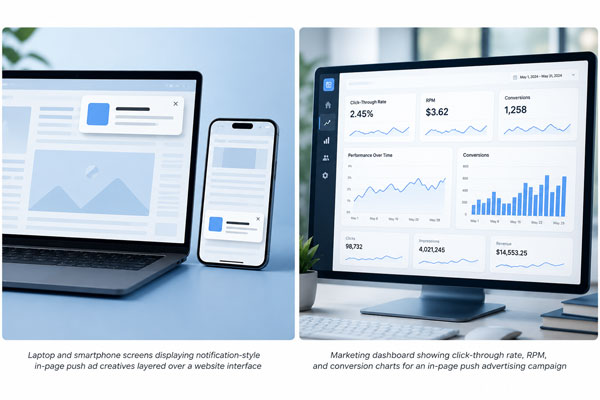
In-page push ads are advertising units that are embedded directly into a webpage's HTML and styled to visually resemble a native operating system push notification. They typically appear as a small rectangular unit in a corner of the screen, complete with an icon, a short headline, and a line of supporting text, closely imitating the look of an Android or desktop notification. The key technical difference from a true push notification is that the ad lives entirely inside the page. It does not use the browser's Push API, does not require a service worker, and does not need the visitor to grant notification permission at any point.
Because the creative is rendered as part of the page itself, in-page push ads can appear immediately on page load or be triggered by a scroll depth, a time delay, or a specific user interaction. This flexibility is one of the format's biggest strengths. A publisher can decide exactly when the unit appears, how long it stays visible, and how many times it can be shown per session, all without touching browser-level notification settings. That makes the format far easier to deploy across a wide footprint of pages, including on mobile browsers such as Safari on iOS, where true web push notifications are historically unreliable or unsupported in certain configurations.
How In-Page Push Notifications Work Technically
From an implementation standpoint, an in-page push ad is closer to a styled pop-up widget than to a genuine system notification. A snippet of JavaScript, usually delivered through an ad network's tag, injects a positioned element into the DOM. That element is styled with CSS to reproduce notification conventions: a rounded card, a small square icon on the left, bold headline text, a secondary description line, and a close button in the corner. Click tracking is attached to the entire card, and impression tracking fires when the element becomes visible in the viewport.
Because there is no dependency on the Notifications API, the ad network handles frequency capping, targeting, and creative rotation entirely on the server side or through first-party cookies and local storage rather than through the browser's own permission and subscription database. This also means in-page push creatives can be swapped, A/B tested, and geo-targeted in real time without needing users to resubscribe or re-permission anything, which is a meaningful operational advantage compared with classic push campaigns that depend on a growing, permissioned subscriber list.
In-Page Push vs Traditional Browser Push Notifications
It helps to separate in-page push from the underlying concept it borrows its visual language from. Traditional browser push relies on a general mechanism often described as push technology, in which a server can send a message to a subscribed client without the client actively requesting it at that moment. On the web, this is implemented through the browser's Push API and Service Worker infrastructure, and it only works after a visitor has explicitly clicked "Allow" on a permission prompt.
In-page push ads intentionally skip that subscription step. The creative is not delivered through the operating system's notification center; it is drawn on the page itself. This has real consequences. Reach is not limited to a subscriber list that has to be built up over months, campaigns can start generating impressions from the very first visitor, and there is no dependency on whether a device's notification settings are enabled. The tradeoff is that in-page push cannot reach a user after they leave the site, the way a genuine subscribed push notification can arrive hours or days later. In practice, many publishers run both formats side by side: subscription-based push for re-engagement with returning visitors, and in-page push for immediate monetization of every session, including first-time and anonymous traffic.
Why Publishers Are Adopting In-Page Push Ads
The single biggest driver behind the format's growth is fill rate combined with format novelty. Standard 300x250 or 728x90 banner slots have been part of the web for more than two decades, and users have developed strong banner blindness toward them. A notification-styled unit interrupts that pattern recognition because it looks like a system alert rather than an advertisement, at least on first exposure. This tends to produce noticeably higher click-through rates than static display formats on the same page, particularly on mobile layouts where screen real estate is limited and a compact notification card fits naturally.
There is also a monetization angle that matters a great deal for content-heavy sites: in-page push does not compete for the same visual real estate as a hero banner or an in-content rectangle. Because it can be positioned as an overlay in a corner of the viewport, it can run in addition to existing ad placements rather than replacing them, adding incremental revenue per session rather than cannibalizing an existing unit. For publishers running lean content operations, that additional revenue line, layered on top of display and native ads that are already in place, is often the deciding factor in adopting the format.
Benefits for Advertisers and Marketers
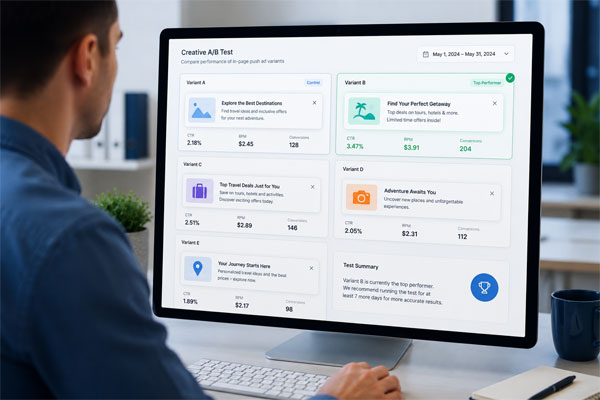
On the demand side, in-page push offers advertisers a format that is cheap to produce, fast to test, and compatible with a very wide range of traffic sources. Creating a creative only requires an icon, a headline, and a short description line, which means marketers can iterate on messaging quickly and run dozens of creative variants without the production overhead that video or rich media formats demand. This makes the format especially attractive for performance marketers running direct-response campaigns in verticals such as software downloads, subscription services, finance offers, and travel deals, where quick testing cycles and low creative costs directly improve return on ad spend.
Targeting options offered by most networks running in-page push inventory typically include device type, operating system, geography, connection type, and dayparting, which allows advertisers to concentrate spend on the segments most likely to convert. Because the format does not depend on a subscriber base the way classic push does, campaigns can scale immediately across a network's full available inventory rather than waiting for an audience list to grow, which shortens the time between launching a campaign and seeing meaningful volume.
In-page push creatives render inside the page itself, mimicking a native notification without requiring browser permission prompts.
User Experience and Compliance Considerations
Because in-page push ads are designed to resemble system notifications, publishers and networks carry a responsibility to keep the format honest. A unit that too closely imitates an operating system alert, or that implies a message from the device itself rather than an advertisement, risks confusing users and drawing regulatory attention. Clear labeling such as a small "Ad" or "Sponsored" tag on the creative, a visible close button, and reasonable frequency capping are standard practices that reputable networks build into the format by default.
These concerns sit within a broader regulatory conversation about disclosure in digital advertising. Native and notification-style formats that blend into surrounding content or system interfaces have been a recurring focus for consumer protection regulators. In the United States, the FTC's guidance on native advertising disclosures lays out the general principle that ads should not mislead a reasonable consumer about their commercial nature, regardless of the specific visual format used. Publishers running in-page push inventory should confirm that their ad network enforces clear ad labeling, respects opt-out and close interactions, and does not stack multiple overlapping units in a way that degrades the page experience or violates platform advertising policies.
Best Practices for Implementing In-Page Push Campaigns
Placement timing has an outsized effect on performance. Triggering the unit immediately on page load tends to produce more impressions but lower engagement, since visitors have not yet oriented themselves on the page. A short delay of a few seconds, or a trigger tied to a scroll-depth threshold, generally produces stronger click-through rates because the visitor has already demonstrated some intent to stay on the page. Frequency capping is equally important: showing the same visitor multiple push-style units in a single session quickly erodes trust and increases bounce rate, so most experienced publishers limit exposure to one or two units per session per page.
Creative design also benefits from restraint. Icons should be simple and legible at small sizes, headlines should be short enough to avoid truncation across different screen widths, and the overall styling should stay close enough to platform notification conventions to be recognizable, without attempting to copy a specific operating system's exact visual identity in a way that could be seen as deceptive. Testing creative variants against different audience segments, rotating offers regularly, and monitoring viewability alongside click-through rate all help maintain performance over time rather than letting a single creative fatigue an audience.
Common Mistakes That Reduce Performance
The most frequent mistake publishers make is stacking too many push-style and pop-style formats on the same page simultaneously. When a visitor is confronted with several overlapping notification-style units at once, the entire page reads as low quality, trust drops, and both engagement and time-on-site suffer, which ultimately reduces total ad revenue even though each individual unit might show a reasonable click-through rate in isolation. A second common error is neglecting mobile-specific testing. Because in-page push units are frequently viewed on small screens, a card that looks fine on desktop can overlap navigation elements or cover critical content on a phone, which hurts both user experience and campaign performance.
On the advertiser side, a common misstep is treating in-page push exactly like a subscription-based push campaign and expecting delayed re-engagement value from it. Since in-page push does not persist after the session ends, campaigns should be planned around immediate, in-session conversion actions rather than long-tail re-engagement, and budgets should be allocated accordingly rather than mirroring a strategy built for permission-based subscriber lists.
In-Page Push Ads and Ad-Blocker Resilience
One underappreciated advantage of the format is its relative resilience against consumer ad-blocking tools. Many popular ad blockers rely on filter lists that target known banner ad servers, specific div class names, or iframe patterns associated with display advertising. Because in-page push creatives are rendered through first-party or lightly obfuscated network tags and styled with generic, frequently changing markup, they can be harder for generic filter lists to catch consistently compared with long-standing display formats that have been targeted by blocklists for years. This does not mean the format is immune to blocking, since dedicated filter list maintainers do add rules for popular in-page push networks over time, but it does explain part of the fill-rate advantage publishers commonly report after switching from pure display to a mixed inventory that includes in-page push.
Key Metrics for Measuring Campaign Success
For publishers, revenue per thousand sessions, often shortened to RPM, is the headline metric, but it should always be read alongside bounce rate and average session duration. A format that lifts RPM while quietly increasing bounce rate is trading long-term audience retention for short-term revenue, which is rarely a good deal for a content site that depends on repeat visits. Click-through rate on the push unit itself is useful for comparing creative and placement variants against each other, but it should not be evaluated in isolation from overall page engagement metrics.
For advertisers, cost per click and cost per acquisition remain the primary efficiency metrics, but viewability and post-click landing page bounce rate deserve equal attention. A push-style ad that generates a high click-through rate but sends traffic to a landing page with a poor mobile experience will show disappointing conversion numbers regardless of how well the ad creative performed. Running consistent UTM tagging and connecting ad network reporting to a proper analytics or attribution platform makes it possible to see the full funnel rather than judging the campaign purely on network-reported click data.
Tracking RPM, click-through rate, and post-click engagement together gives a fuller picture of in-page push campaign performance.
Choosing the Right Ad Network Partner
Not every network selling in-page push inventory offers the same quality of targeting, fraud protection, or creative review. Publishers should look for networks that provide transparent reporting, clear frequency-capping controls, and enforced ad labeling, since these features directly protect both revenue and audience trust over time. Advertisers, meanwhile, should evaluate a network on the quality and verification of its traffic sources, the granularity of its targeting options, and how quickly campaign changes propagate, since slow iteration cycles make it harder to optimize spend efficiently in a format that thrives on rapid creative testing.
It is also worth checking how a network handles cross-device and cross-browser compatibility, since in-page push relies entirely on standard web rendering rather than a native app or browser subscription layer. A network with mature tag technology should render consistently across Chrome, Safari, Firefox, and Edge, on both desktop and mobile, without requiring publishers to maintain separate implementations for different platforms.
Final Thoughts
In-page push ads occupy a useful middle ground in the advertising landscape: more attention-grabbing than a static banner, but easier to deploy at scale than a permission-based push subscription program. For publishers, the format offers a practical way to add incremental revenue without waiting for a subscriber list to grow, while for advertisers it provides a low-cost, fast-testing creative format that performs well across a wide range of verticals. As with any advertising format, the details of implementation, from frequency capping to clear labeling to mobile-specific testing, determine whether the format becomes a sustainable revenue source or a short-term gain that costs a site its audience trust in the long run.
Approached carefully, with attention to placement timing, creative quality, and compliance with disclosure expectations, in-page push remains one of the more resilient and adaptable formats available to publishers and advertisers navigating a web increasingly shaped by ad blockers, banner fatigue, and shrinking browser permission rates.