Choose only a funding method currently offered inside your account. Availability can depend on the issuing bank and the transaction, so an advertised international funding option should be tested before an urgent booking. Start with a modest amount that you can use for a genuine purchase, subject to any minimums, and wait until the account shows the money as available.
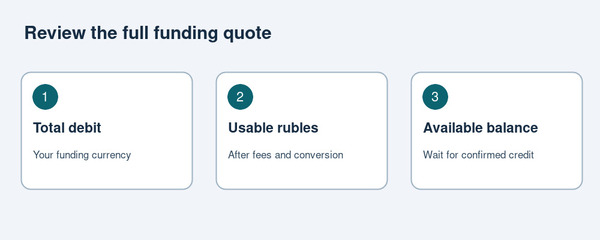
Record two figures before approving: the total amount charged in your funding currency and the ruble balance you will receive. Ask whether a service fee is included, deducted from the credit or charged separately. Your own bank may also apply a fee or currency conversion. A reference exchange rate alone does not tell you the final cost of the transaction.
Compare quotes on the same basis: the same funding currency, approximately the same time and the same usable ruble amount. If a quote expires, obtain a fresh one rather than assuming the original conversion still applies. Keep the approval screen and confirmation with your records, while hiding sensitive card details if you share a screenshot with support.
The accessible material did not establish a current, complete fee schedule or guaranteed funding time. Do not budget on an assumed zero commission or immediate credit. Ask about minimum top-ups, transaction limits, cancellation of an unsuccessful top-up and returning unused funds before committing a substantial balance.
A debit on your funding card is not sufficient evidence that the spending balance is ready. Check both sides of the transaction. If the card shows a charge but PayInRussia does not show available funds, record the time, currency and reference and contact support before attempting another top-up. Repeating the same action can make it harder to identify which transaction needs attention.
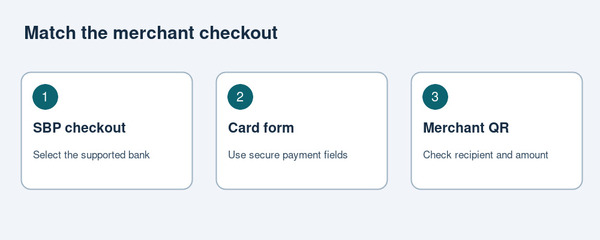 |
| Three merchant payment routes for supported purchases |
|
Match the payment tool to the seller’s checkout.
Online checkout through SBP
Where a seller offers the Russian payment network, select that option and follow the bank-selection screen. PayInRussia’s tour and transfer payment instructions (https://new.payinrussia.com/faq/pay-for-tours-and-transfers-in-russia/) identify the entry Промсельхозбанк (PayinRussia / Плати в России). Check the current displayed name against the service’s instructions. Open the resulting approval request, inspect the merchant and amount, and confirm only when they match your order.
After approval, return to the seller’s website. Save its paid-order or booking confirmation as well as the payment reference. If your browser opens a payment page on another device, use only the handoff options actually offered. Do not improvise by sending an unrelated transfer to a phone number supplied in a chat.
Card details in a supported website or app
Some purchases use a card-number form rather than a bank-selection screen. When your account provides usable card details, enter them into the genuine merchant checkout and complete any requested authentication. Keep the merchant’s order reference. Check whether saving the card also authorises future charges, particularly for an app, subscription or recurring service.
Use the merchant’s secure payment form for card numbers, expiry dates and security codes. A guide, driver or booking contact does not need those details pasted into a messenger conversation. If a form rejects the card, ask which supported payment route the seller offers instead of assuming repeated attempts will resolve the issue.
QR payment at a counter
The Bank of Russia’s SBP instructions require checking the recipient and amount before confirming a QR purchase. At a participating seller, open the payment tool, scan the merchant’s code and inspect the resulting details. If an amount needs entering, match it to the bill. Confirm once and let the seller verify receipt.
A QR code shown on the same phone you use for payment requires a supported link, image-import option or other official handoff. Ask the seller or service for the correct method. Keep the distinction between a merchant purchase and a personal transfer: a phone number alone does not establish that your account supports the requested transaction.
For a first purchase from abroad, keep the order page available while you complete approval. Check the currency as well as the digits, especially if the seller displays a converted estimate alongside the ruble price. If the approval screen names a payment intermediary rather than the shop, ask the merchant to explain the relationship before proceeding. An unfamiliar name deserves clarification, not a guess.
5. Apply the workflow to bookings, purchases and services
Keep the purchase terms alongside the payment confirmation.
For accommodation, establish whether you are paying the booking platform or the property, and whether the amount covers the whole stay. PayInRussia’s hotel payment guide (https://new.payinrussia.com/faq/pay-for-a-hotel-in-russia-with-a-foreign-card/) describes online payment and payment at reception as separate options. Ask the property about deposits, outstanding charges and the method accepted on arrival. A prepaid reservation should not leave an unexplained balance at check-in.
For tours, transfers or other appointments, agree the service date, number of participants and what the quoted price includes. Ask whether the online payment is a deposit or full settlement. If part is due later, record the amount and accepted payment method now. Retain the operator’s confirmation rather than relying solely on a payment screenshot.
For cultural tickets, choose the venue, date, admission category and visitor details before paying. PayInRussia’s museum and theatre ticket guide (https://new.payinrussia.com/faq/buy-museum-theatre-and-tour-tickets-in-russia/) covers online card and Russian payment-network routes. Check the actual ticket-delivery instructions and any identification requirements on the venue’s checkout. Payment approval is only one stage of obtaining a valid ticket.
For a physical purchase arranged from abroad, clarify delivery separately. Ask whether the seller can deliver to the intended address, who receives the parcel and whether shipping is included. A functioning payment route does not establish that an item can be exported or delivered internationally. Keep the item description, quantity and delivery commitment with the order record.
For professional or personal services, ask for a clear invoice or written order. Match the recipient to the business you engaged and query any unexplained change of beneficiary. Before paying a final balance, agree how the provider will acknowledge settlement and supply the promised result, whether that is a reservation, appointment confirmation or completed work.
6. Resolve failed payments and establish the refund route
Resolve an uncertain payment before making a second attempt.
When checkout fails, first identify the stage: account funding, payment approval or merchant confirmation. Check the available balance, connection and exact error message. PayInRussia’s declined-card guidance (https://payinrussia.com/faq/what-to-do-if-your-card-is-declined-in-russia/) describes QR payment or ruble cash as alternatives at participating tills. That does not establish that every QR failure has the same cause or that every seller supports the service.
If no debit occurred, ask the merchant to refresh an expired payment request before retrying. If funds were debited but the order remains unpaid, preserve both references and ask the merchant and payment provider to reconcile them. Avoid paying again simply because the booking page has not updated. Establish whether the first payment succeeded, remains pending or will be reversed.
Before a refundable purchase, ask where a refund will arrive and how long the merchant expects processing to take. Also ask the service how you can use or recover money returned to the account. A merchant refund and withdrawal of an unused balance are different operations; do not assume the availability, timing or cost of one proves the other.
Keep a compact record: merchant name, order number, amount in rubles, payment time, transaction reference and correspondence. Never provide a password or one-time authorisation code to someone offering to investigate a refund. Follow support channels reached through the official service and give only the information needed to identify the transaction.
If you cancel a service, send the cancellation through the channel specified in the booking terms and keep the acknowledgement. Record any cancellation reference separately from the original payment reference. Ask whether the merchant has merely accepted the request or has actually initiated repayment. That distinction helps you direct a later query to the party responsible for the next step.
7. Complete the final checks before committing funds
Check the rules applying to your payment as well as its technical feasibility. The UK’s Russia sanctions guidance, for example, includes restrictions involving designated persons and financial institutions. Other jurisdictions apply their own rules. Ask your bank or an appropriately qualified adviser about a transaction you cannot confidently assess. A successful checkout is not confirmation of legal eligibility.
For travel spending, maintain a practical backup. PayInRussia’s advertised virtual card does not support ATM withdrawals. Arrange any necessary ruble cash separately and check current customs and currency rules before carrying money across a border. Do not leave an essential arrival payment dependent on an untested account, phone connection or merchant checkout.
- Seller: the purchase, recipient, price and payment deadline are clear.
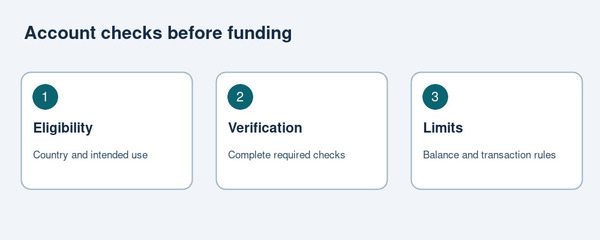
- Account: registration, verification and relevant limits are confirmed.
- Funding: the total debit and usable ruble credit are understood.
- Checkout: the merchant offers a route your account supports.
- Evidence: you can save both payment and order confirmations.
- Recovery: support and refund arrangements are known before payment.
Once those checks are complete, fund the amount needed, review the seller’s details and approve the purchase through the matching route. Finish by checking the merchant’s confirmation and retaining the receipt. For a later booking or purchase, repeat the checks against the current terms: an earlier successful payment does not establish that prices, limits or acceptance remain the same.